> ## Documentation Index
> Fetch the complete documentation index at: https://docs.orbitroblox.xyz/llms.txt
> Use this file to discover all available pages before exploring further.
# Example
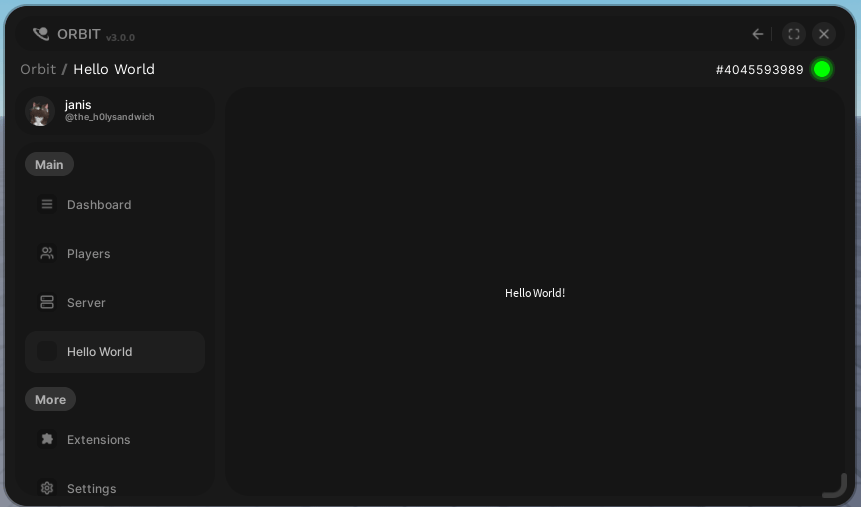
An example of a simple page that shows "Hello world!".
Start with the structure, since all we need is a window that shows hello world we need a client-side script to create it and a frame that has the content.
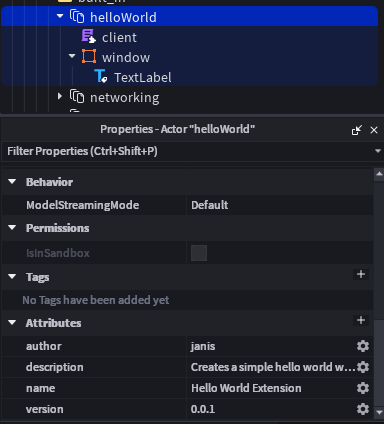 *The class is decorative*
Now for the code, we need to make sure the API has permission:
```luau theme={null}
return function(api, ext)
if not api.navkit then
warn("Unable to access Navkit, aborting.")
return
end
end
```
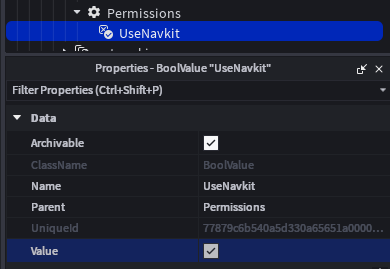
Now apply a permission too since this will just error every time:
*The class is decorative*
Now for the code, we need to make sure the API has permission:
```luau theme={null}
return function(api, ext)
if not api.navkit then
warn("Unable to access Navkit, aborting.")
return
end
end
```
Now apply a permission too since this will just error every time:
 Good! Now to actually create the window we need a category first. In this example we'll just reference a category made by Orbit, `orbit.main`.
```luau theme={null}
return function(api, ext)
if not api.navkit then
warn("Unable to access Navkit, aborting.")
return
end
local window = ext.window
api.navkit.newButton(
"helloWorldButton", -- id
{
category = "orbit.main",
name = "Hello World", -- what is displayed on the button
icon = nil, -- optional, nil cus im lazy
layoutorder = 99, -- optional, put it as last
clone = false, -- optional, we don't want to clone our window
},
window
)
end
```
And done! That's it.
Good! Now to actually create the window we need a category first. In this example we'll just reference a category made by Orbit, `orbit.main`.
```luau theme={null}
return function(api, ext)
if not api.navkit then
warn("Unable to access Navkit, aborting.")
return
end
local window = ext.window
api.navkit.newButton(
"helloWorldButton", -- id
{
category = "orbit.main",
name = "Hello World", -- what is displayed on the button
icon = nil, -- optional, nil cus im lazy
layoutorder = 99, -- optional, put it as last
clone = false, -- optional, we don't want to clone our window
},
window
)
end
```
And done! That's it.
Have fun creating extensions!
Please follow [our guidelines](/extensions/rules) when doing so.