
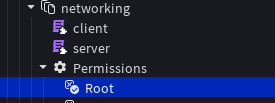
Permissions. In this example, we will just give ourselves full permission:• Root (BoolValue, true) Which then should look like this:
Functions that start with a
_ (underscore) are usually exposed internal functions and should not be used if you don’t know what they do.Shared
manifest
A table on all the attributes you set in the extension.capabilities
Another table, this time with the permissions.remotes
Allows you to access the Remotes for Orbit’s namespace.
UsesByteNet-Max.
More Information in the future.Logger
Debug API. Instead of prints we have a centralized log that prints by entering--orbit logsinto the console.
Shared (Permission-Based)
Notify(UseNotif)
An API that you always have access to.
Allows you to send notifications.
Leave out target if on client.
Server
permitted(userId: number, permission: string)
A function exposed to check for permission. To see if someone has access to the panel, simply check for theActivepermission.info
A configuration instance provided, that allows you to read following info (through attributes):
•thumbnailThe game’s thumbnail.
•descriptionThe game’s description.
•iconThe game’s icon.
•serverCodeThe server code generated by networking. (Keep in mind this will not be changed if Networking is disabled)
•uptimeUptime tracked by Orbit.
•versionThe version of Orbit currently running.
Server (Permission-based)
Webhook(UseWebhook)
Client (Permission-based)
contextmenu(UseContext)
Allows usage of the context menu.navkit(UseNavkit)We recommend keeping category identifiers like this:extension.category.
A perfect example is Orbit’s categories.
TheMaincategory is underorbit.main, andMoreis underorbit.more.
Both get created at runtime using.newCategory.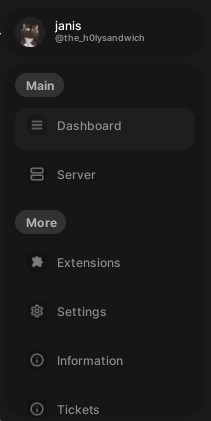
modals(UseModals)constructors allow you to change content of pages dynamically on call!
For example, if it includes loading a user profile, you callmodals:switchTo("profile", {userId = 1})which will then be included into the constructor!modals.new("profile", profileModal, function(modal, userId) ... end)breadcrumbs
Self-explanatory.The data oncrumbcan be formatted like this:Extension/Settings, or justSettings. FromRoot will set the crumb toOrbit/and continue from there. Modals and Navkit do this automatically!